
Labeling your full inbox, automatically
Email is the wild west: the price of admission is close to zero and there are no real rules, so you either spend a huge amount of your time curating what’s in there by hand, or you declare bankruptcy and hope you don’t miss the important things in the endless flow of unwanted mail. We built a series of classifiers that run on every email in Carom and make sense of it before you even open it.
Why metadata matters
An email client knows surprisingly little about your mail. It knows who sent a message, when, the subject, and whether you’ve read or flagged it. That’s enough to sort by date, and not much else.
The questions you actually ask when you’re working through email are different, and they have historically required human judgment. Is someone waiting on me? Am I waiting on someone, and for how long? Is this a person or a receipt? Is this person upset? Can I answer it in two minutes, or is it a project?
If your inbox can’t answer those questions for you, you have to open everything to find out for yourself—which is how important replies end up buried under newsletters, and why inbox zero feels unachievable.
Carom’s classifiers answer those questions for every email you receive. What you do with the answers, and how you choose to manage your email, is, as always, up to you.
Building custom classifiers instead of using large language models
We use (and love!) large language models (LLMs). We use them throughout Carom to power the agents you turn on and the AI assistant we’ll talk about soon.
But LLMs aren’t the right tool for this job. They’re slow and expensive, so we would have to charge you obscene amounts every month, especially if you want all of your email assessed. And LLM reasoning and performance are hard to measure at scale. Where complex thought is required, they’re great. When you want to know whether an email asks for a meeting, there are better tools.
So we trained our own small model for this. It’s fast and cheap enough to run on every message, it gives the same message the same answer every time, and when it isn’t sure, it leaves the answer blank rather than guessing. We can keep tuning it as we see where its performance isn’t as good as we’d like.
And since privacy is paramount, it sees as little as possible. The classifier gets the text of one message, returns its answers, and retains nothing.
The classifiers run on all of your mail, including everything that was in your inbox before you came to Carom. If you want to find out which customers were happy and which were angry five years ago—well, we have the data for that.
The classifiers
| Classifier | What it detects | Where you see it |
|---|---|---|
| Next move | Whose turn it is: yours, theirs, or nobody’s | Awaiting your reply and Awaiting their reply lists, the overview’s Awaiting reply tab, reply icons on email rows, the daily briefing |
| Owed by | When several of your teammates are on an email, which of them the reply is on | Puts the email in the right person’s Awaiting your reply list |
| Urgency | How soon a reply is needed: no rush, eventually, soon, or now | Urgent list, the color of the reply icon, an Urgent label on the message, the Urgency filter |
| Tone | Whether the latest message from outside your company is warm, positive, neutral, frustrated, or upset | Frustrated or upset list, a frown icon on the row, a label on the message, the Tone filter |
| Request | Whether the message asks you or your team to do something | The overview’s Quick replies cut |
| Meeting request | Whether the message asks to meet | Meeting requests list and filter |
| Mail type | Personal, group or forum, transactional (receipts and alerts), notification, newsletter, or marketing | The Person / Automated / Newsletter tabs on the email list, labels on messages, collapsing automated mail inside a thread |
| Sender kind | Whether an address belongs to a person, a shared inbox, or an automated sender | Contact types and the Automated senders contact list, the Contact type filter |
| New work | Whether a thread might contain a task | Decides whether the task agent reads the thread |
| Deal activity | Whether a message might be about one of your deals | Decides whether the dealmaker agent reads the message |
How Carom uses them
Awaiting reply
The most important question is who owes whom. Carom’s overview has an Awaiting reply tab listing every email where the next move is yours, with quick cuts for the urgent ones, the ones you can answer quickly, and meeting requests. The same answer drives the Awaiting your reply and Awaiting their reply lists in email.
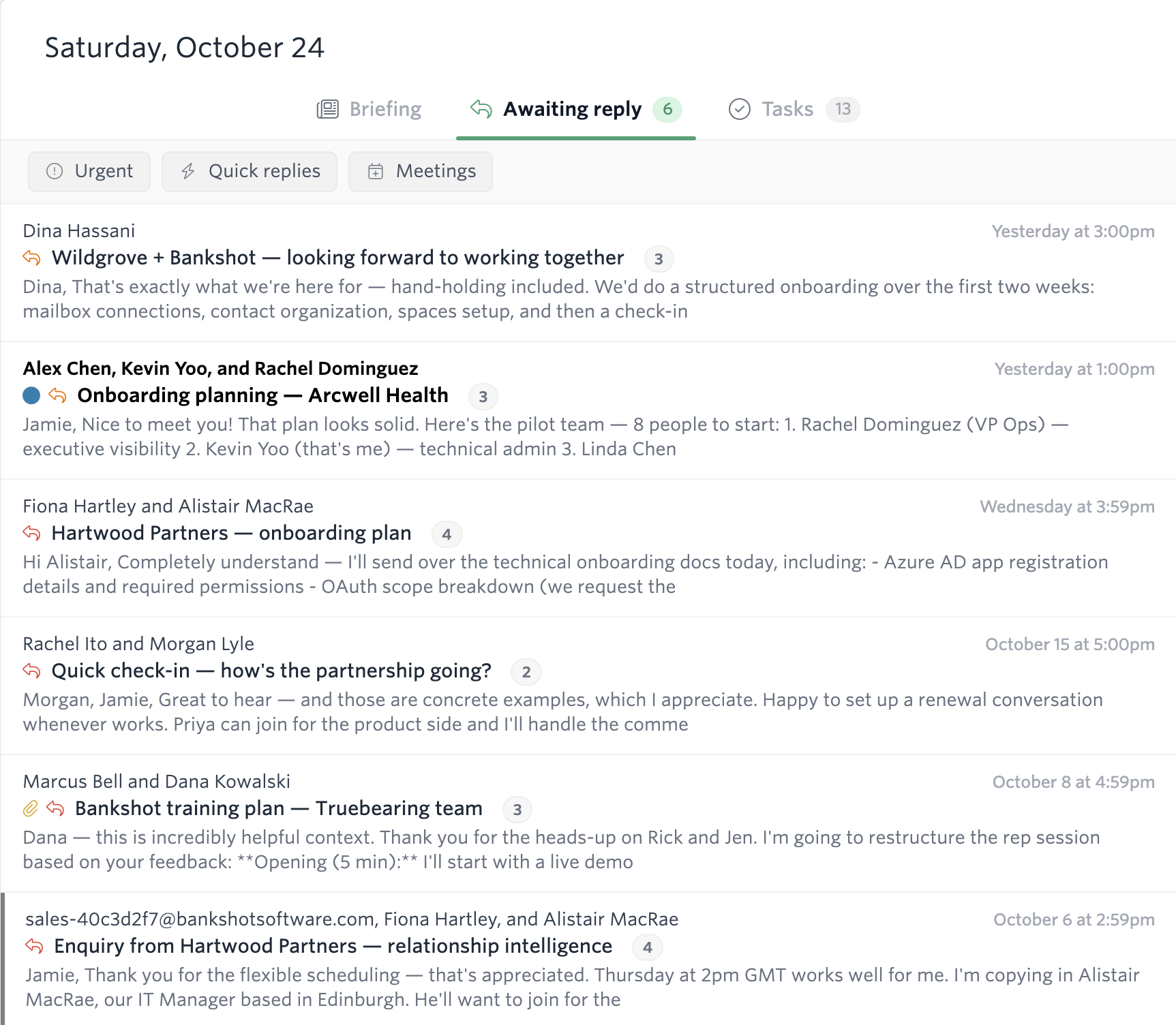
Who owes a reply is worked out per person. If you and two teammates are on a thread and the client asks one of you a question, it shows up as awaiting a reply from that person—not from all three of you. When you resolve a thread, it leaves the list until a new message puts the ball back in your court.
On each email row, a reply icon shows that the move is yours and an hourglass shows you’re waiting on them. The icon gets more insistent the longer the email waits, and sooner if the classifier read it as urgent.
Lists, tabs and filters
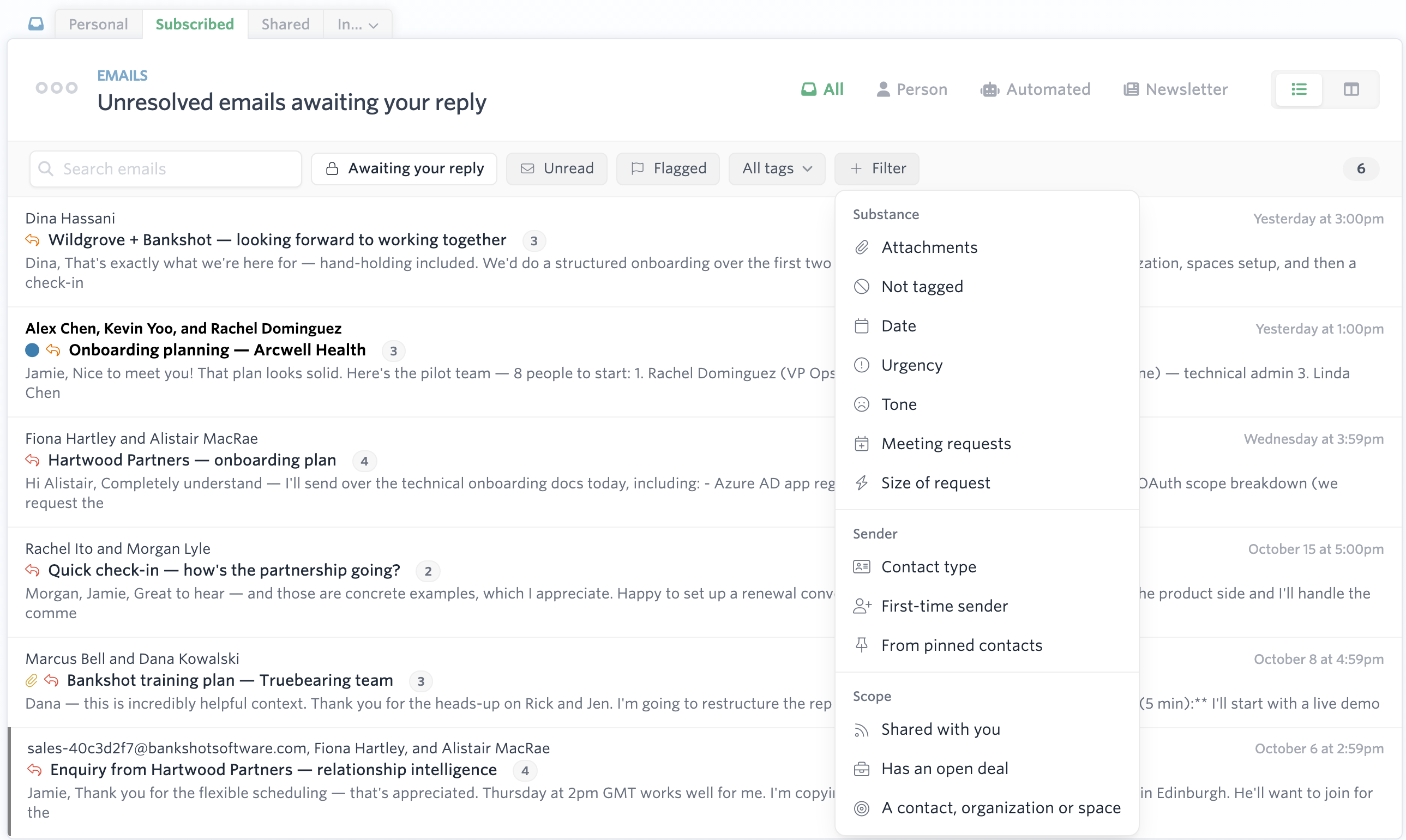
Each classifier is also a filter. The email list has Person, Automated and Newsletter tabs built on mail type, so you can look at only the mail people wrote. The sidebar has ready-made lists for urgent emails, emails from frustrated or upset senders, and the two Awaiting reply lists. The Filter menu lets you combine any of them with tags, contacts, dates and the rest.
Saved views and notifications
A saved view can use any of these filters—“urgent emails from clients”, say, or “anything awaiting my reply from a pinned contact”—and you can ask to be notified when a new email matches, either right away or in your daily briefing. The notification tells you which view matched, so you know why the email matters before you open it. More about that soon!
The daily briefing
The daily briefing pulls from the same answers. Its list of replies you owe is the Awaiting your reply list, and it calls out threads that have gone quiet: ones where you’ve been waiting on the other side for more than three days.
Agents
Carom’s agents that suggest tasks and move deals use a sophisticated large language model, which is essential for complex reasoning about what task an email is asking for or how a deal is advancing. But the vast majority of emails involve neither. The new work and deal activity classifiers screen each thread first, and the agent only reads what passes, so we only hand work to expensive LLMs when we think it will be valuable.
You can see all of this in the demo. Pick a persona and open the Awaiting reply tab on the overview. As always, if you’d like to learn more about our classifiers or anything else, just let us know.