
A CRM for Google Workspace, built from your team’s Gmail
Connect Gmail and Google Calendar, and Carom assembles the contacts, companies, files, and history for your whole team. There is nothing to install, and your Gmail stays exactly as it is.
- Verified by Google to read Gmail
- Private until you share it
- Revoke access in your Google account anytime
You choose what Carom may do in your Google account
You sign in with Google, never with a password we hold. Reading mail is the one permission Carom needs. The other four are switches you set before Google’s screen appears, and you can leave any of them off.
Carom has passed Google’s restricted-scope verification, the review Google requires of every app that reads Gmail.
What a Gmail thread becomes
The same conversation, with the people grouped by company, the deal it belongs to, the tasks that came out of it, and your team’s private notes alongside.
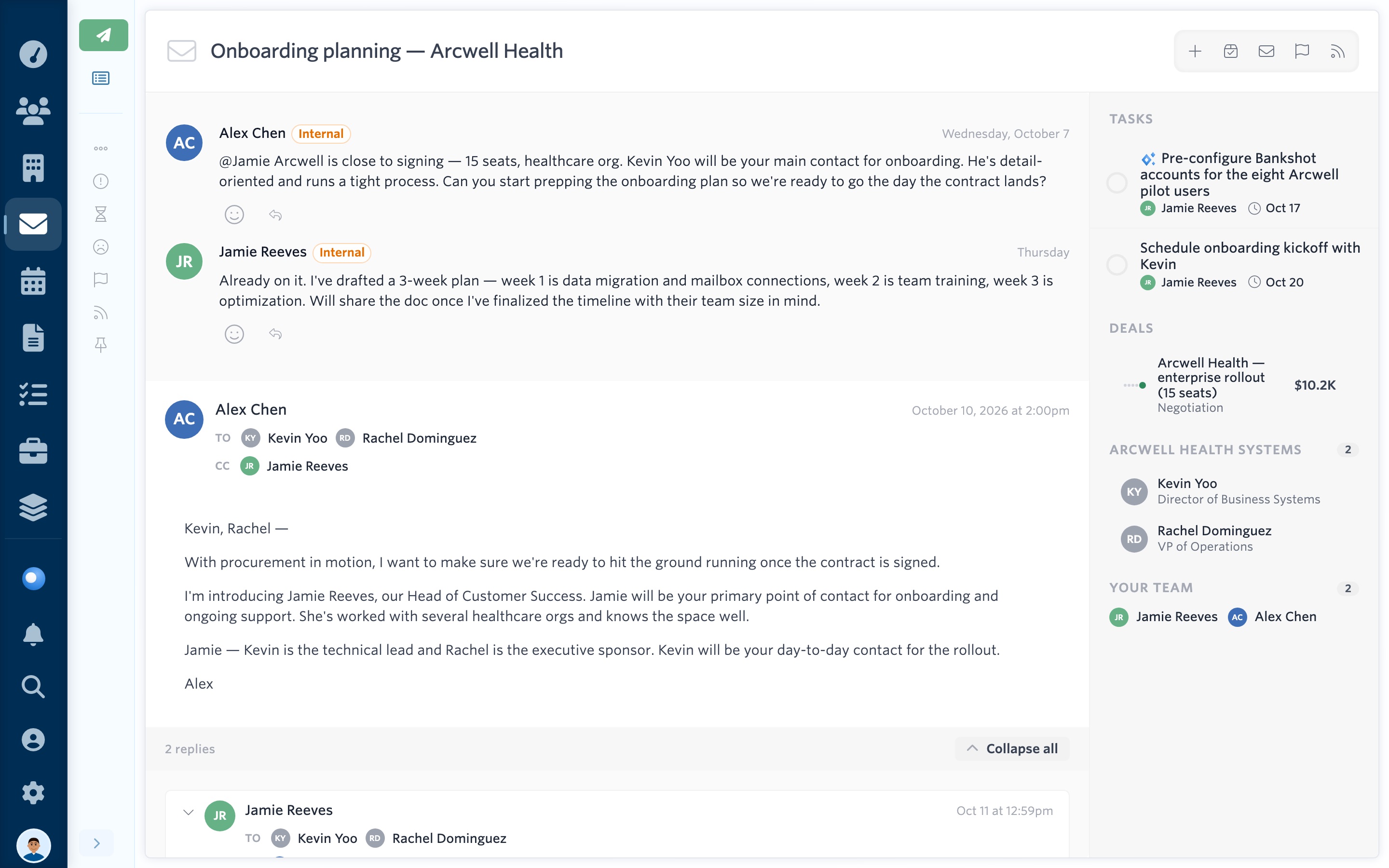
See it yourself: open the live demo, pick any teammate, then choose Emails and Onboarding planning.
A Gmail CRM without a Chrome extension
Carom runs beside Gmail in its own workspace and builds one client record from everyone’s mail. Many Gmail CRMs work the other way, as an extension that adds a panel to each person’s inbox.
Carom, beside Gmail
Built for clients who talk to several of you. Everyone keeps using Gmail as it is, and Carom reads each connected mailbox into one set of client records.
A CRM inside Gmail
Built for people who never want to leave the inbox. Each teammate installs the extension, and the CRM appears as a panel next to their own mail.
Carom adds nothing to your Gmail window.
From your Gmail address to a working CRM
-
Sign in with Google
A Workspace address on your own domain or a personal @gmail.com both work. Choose which optional permissions to allow, then approve them on Google’s own consent screen.
-
Start the import
Carom brings in the whole mailbox except spam, trash, and drafts, and keeps up with new mail from then on. It runs in the background; a large mailbox can take a few hours.
-
Your records appear, and only you can see them
Contacts, organizations, threads, files, and meetings are linked to each other and private to you. Share a thread, a contact, or the mailbox when it would help a colleague.
-
Bring in the team
Each teammate connects their own Google account the same way. Connect an address like sales@ and share it, and everyone you choose can read it or reply from it.
Questions from Google Workspace teams
Which Google permissions does Carom request, exactly?
Always: your email address and gmail.readonly. Only if you switch them on: gmail.send, gmail.modify (used for read and starred state only), calendar.readonly, and contacts.readonly. Nothing for Drive.
Does my Workspace admin need to install anything?
No. Each person connects their own account, and there is no domain-wide access. If your admin restricts which third-party apps can connect to Workspace, they will need to allow Carom first.
Will it change anything in my Gmail?
Only read and starred state, and only if you switch that on. Carom never archives, labels, moves, or deletes mail. Gmail stays the place your mail lives.
Can I still reply from Gmail?
Yes, and most people do. Replies you send from Gmail show up on the client’s record like any other mail. If you allow sending, you can also reply from Carom, and the message goes out through your Gmail account.
What about sales@ or info@?
If the address is a Workspace user someone can sign in as, connect it and share it with the team. A Google Group has no mailbox of its own to connect; its messages arrive through each member’s inbox instead.
Part of our team is on Microsoft 365. Is that a problem?
No. Mailboxes on Microsoft 365 and Google Workspace can sit in the same Carom account and feed the same client records.
Look around before you connect anything.
The live demo is a five-person team’s mail after Carom has read it, with no Google account involved.